
Back to projects

Shark Void Command

SPACE STRATEGY · VERSION 0.21.5 FOR TESTING

Choose a faction and command your fleet in 3D space battles. Adjust shields, energy and weapons to face your opponent. Try the development version in your browser, on your computer or on Android.

How to play

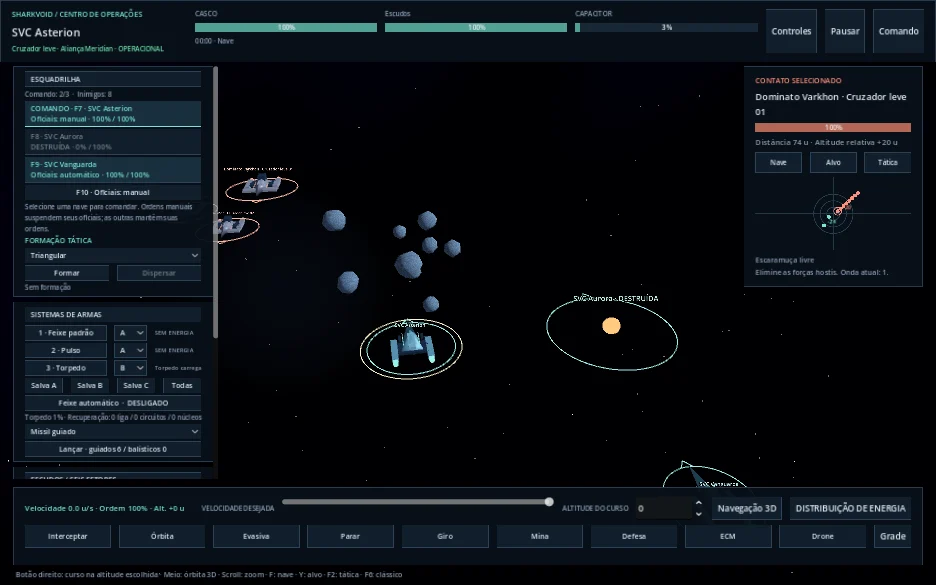
In the game, open “Configurações” → “Controles” (Settings → Controls) and choose “Mouse e teclado” (mouse and keyboard), Gamepad or Touch.

On the keyboard, Up/Down increase or decrease speed; Left/Right turn the ship. Up together with a turn key increases the turn rate within the ship’s limits. Release the keys to hold course and speed. Tab cycles through detected enemies without firing.

In Touch mode, use the directional control on the left to change course. The “Vel.” control beside it sets your speed, which is kept when you release it. Tap an enemy or use the arrow reticle to change targets, then use the firing buttons to attack. Adjust your ship during combat with the shield and energy panels.

On phones, play in landscape. The button above the game offers fullscreen or Home Screen instructions, depending on your browser. The game opens in this tab and audio starts after you interact. The first load may take a few moments.

Space battle with ships, asteroids and squadron command panels.

Play on your computer or on Android

Version 0.21.5 · Check the requirements for each platform below.

Sign in to download the apps. The session lasts up to 48 hours; the browser game remains public.

Checking access…

Linux

Mark the AppImage as executable in the file properties and open it to play.

Version 0.21.5 · 128.8 MB · shark-void-command-0.21.5-linux-x86_64.AppImage
Verify integrity (SHA-256)5d33bd2575183019cbb4bbc83cd1b9f35eeba93e6f80266150471aa4c57be336

Windows

Extract the ZIP and open sharkvoid-command.exe. Keep the files in the folder together.

Version 0.21.5 · 132.0 MB · shark-void-command-0.21.5-windows-x86_64.zip
Verify integrity (SHA-256)9150006eb1ca85dd8222fd361986f0ce315beb262c88fc49add35ad415bd8efa

Android

Open the APK on Android to install it. The system may ask for permission to install apps through the browser or file manager.

Version 0.21.5 · 121.5 MB · shark-void-command-0.21.5-android-arm64-v8a.apk
Verify integrity (SHA-256)7cb56c51ad82cd3a8b0c62e6665e7d75177ed5f5106fb20f7ac63179a93b68ab

Before you play

The game is in development and may change. The browser version offers offline play; network games are not available in that version.

In version 0.21.1, complete the main objective and cross the red border to finish the mission. Planet visits are optional: choose up to four crew members for turn-based combat and trade with the merchant. Deaths are permanent outside protected training missions. Recruitment becomes available after the mission ends. Windows and physical Galaxy S22 tests are still pending.

Version 0.21.1 uses save14 and reads earlier saves. Migration keeps the previous save in .pre-v14.bak. Older versions cannot read save14; preserve your current files before downgrading and use a copy of a compatible backup in another slot.

The AppImage includes the game, runtime libraries, fonts and keyboard data. Requires Linux x86_64 with glibc 2.36 or later and the system’s OpenGL 3.3 driver. Validated on X11 and headless Debian; Wayland and other distributions still need testing. On systems without FUSE, use --appimage-extract-and-run.

Android 7.0 or later, ARM64 and OpenGL ES 3.0. Signed release APK, tested on the official Android 16 emulator with ARM64 translation. Comfort on a physical phone and sustained performance still need evaluation.

The Windows download includes the files needed to run the game. Running it on Windows has not yet been tested.

View file checksums